ImageCrop using jQuery, the imgAreaSelect plugin, and PHP GD
Someone from ПыхаФорум asked me to help with a library for visually selecting an object in an image and then cropping it—in other words, a “Crop,” as they say! :-)
I implemented the frontend using the jQuery plugin imgAreaSelect, and, of course, with the help of the jQuery library. That took me about 10–15 minutes, since I’d already worked with this plugin and successfully used it on the Moskva.RU project.
I decided to build the backend with PHP GD, although at first I wanted to use PHP iMagick. However, since the imagick library often isn’t installed on hosting servers, I decided not to risk it.
What it looks like
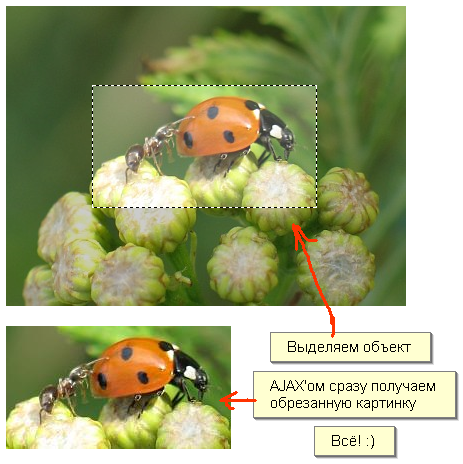
http://demo.adw0rd.ru/imgcrop/
So, let’s move on to the implementation
Download and include imgAreaSelect, as well as jQuery.
<html>
<head>
    <meta http-equiv="Content-Type" content="text/html; charset=utf-8" />
    <title>ImgCrop</title>
    <link rel="stylesheet" href="./styles/screen.css" type="text/css" media="screen" />
    <script type="text/javascript" src="./scripts/jquery-1.2.6.pack.js"></script>
    <script type="text/javascript" src="./scripts/jquery.imgareaselect-0.6.1.js"></script>
    <script type="text/javascript" src="./scripts/imgareaselect.js"></script>

</head>
<body>
    <div id="page">
        <div id="workspace">
            <img style="float: left; margin-right: 10px;" src="ladybug_ant.jpg" id="image"/>
        </div>
        <br style="clear:both" />
        <div id="result"><img src="./images/ajax-loader.gif" alt="ajax" /></div>

    </div>
</body>
</html>
Now let’s look at the frontend implementation:
    function imgCrop(img, selection)
    {
        // загрузка...
        $('#result')
        .html('<img src="./images/ajax-loader.gif" alt="ajax" />')
        .css({display: "block"});

        // отправляем данные бэкенду
        $.post(
        './backend/index.php',
        {
            w: selection.width,
            h: selection.height,
            x: selection.x1,
            y: selection.y1,
            i: $('#workspace > img').attr('src')
        },
        function(txt){
            $('#result').html(txt);
        },
        'text'
        );
    }

    // Сначала инициализируем плагин imgAreaSelect и передаем параметры
    $(window).load(function () {
        $('#image').imgAreaSelect({
            movable: true,
            resizable: true,
            onSelectEnd: imgCrop // после выделения объекта срабатывает ф-ия imgCrop()
        });
    });
I haven’t posted the backend implementation, since it’s not that important for this article. Anyone who needs it can look in the /backend/ directory and find what they’re looking for… ;)
P.S. Don’t forget to set write permissions for the tmp.jpeg file :)
For the simple version:
Demo http://demo.adw0rd.ru/imgcrop/ (NO LONGER EXISTS)
Source code http://adw0rd.com/files/imgcrop.zip
For the extended version:
Demo http://demo.adw0rd.ru/imgcropext/ (NO LONGER EXISTS)
Source code http://adw0rd.com/files/imgcropext.zip
Comments are closed. Read the original discussion in Russian →